yiffalicious
patreon
Hi all!
New build for you.
>>> CLICK HERE TO READ THE RELEASE NOTES <<<
>>> CLICK HERE TO DOWNLOAD <<< (for patrons)
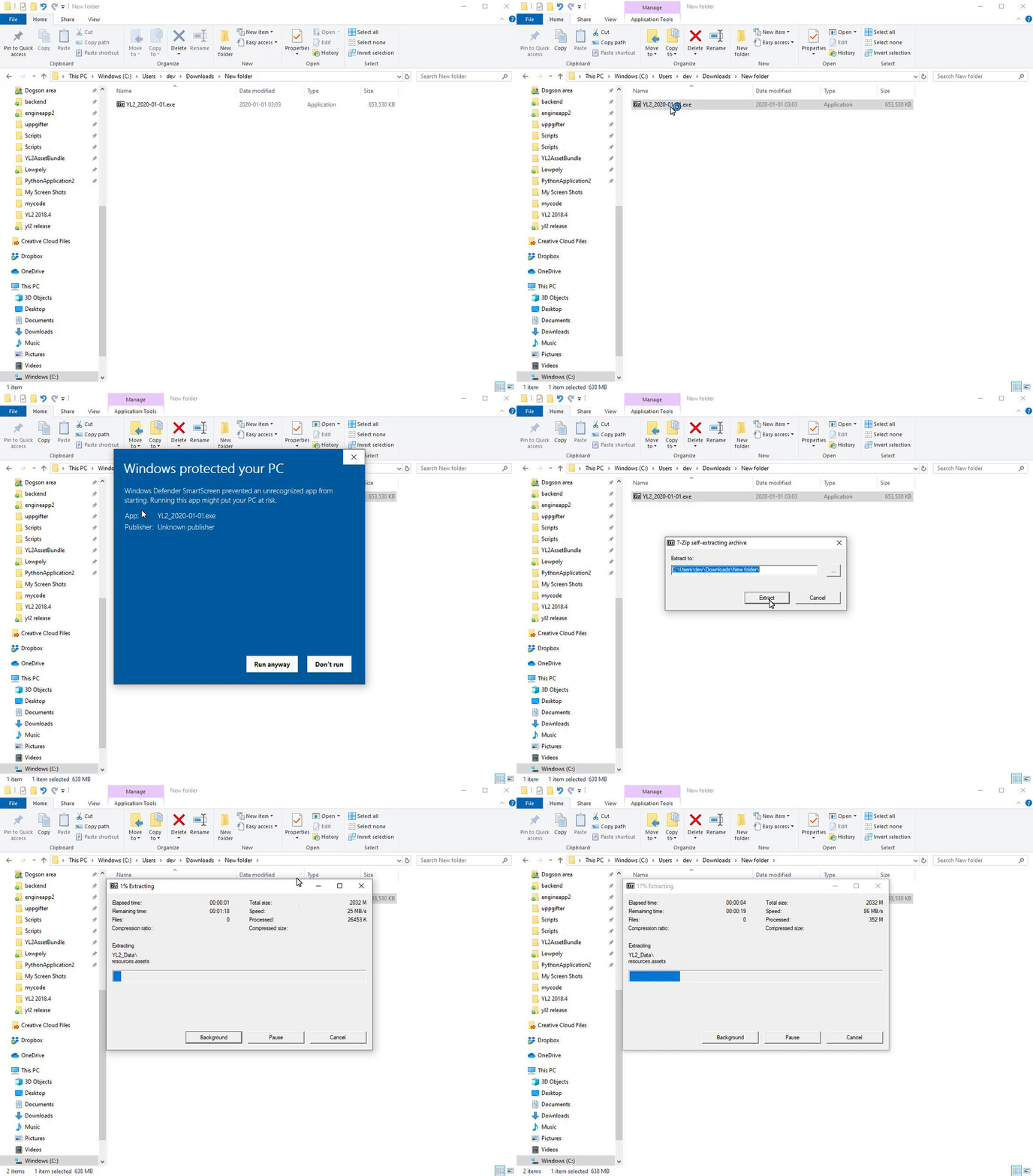
The app comes in a self-extracting archive. You can either run the exe to let it extract itself, or extract it with 7-zip if that makes you feel better.
Windows doesn't seem to like unknown EXEs, so it may block you from running the self-extractor. To unblock it, simply follow these instructions:
All the best.
- FurryVNE Team
Thank you. Was beginning to get worried. Since i noticed a lot of characters from the VNEcloud were having this issue. After Build 2024-02-09
After further discussing this, we have decided to revert the changes. You will not have to update characters.
Thanks for sharing that. After taken a look at this, I realize it's not the former explanation which is causing this. Rather, in order to fix a bug where child parts were not following parent transform (physical chains), we had to move them to the parent model (rather than its container). If the parent has a transformation that differs from the container, the local coordinate system will not be the same. There's no easy solution to this other than updating the characters.
No problem. I'm happy that it maybe can be fixed. Thank you. It's the Shark character on VNE Cloud. parts->ears->parts->Inner ear is out of place and turned downwards. character name: Ghostly author: @Chyanna
Yeah, sorry, the head bone was improperly rotated after applying shape keys in some circumstances, so that had to be changed. Any parts or masks or whatever that were designed for the improper head rotation will have to be adjusted. Can you share what character exactly it is you're having this issue with?
Same here the sharkear on my old shark character is rotated in a random direction with the new Build 2024-02-09. And was parented. Hopefully it will get resolved. As some cloud characters are broken now.
I think the build messed with everything that was parented to parts (masks, subparts,...) by resetting their rotations or something. For example if I have a horn socket as part and a horn as part of the socket, the horn is now rotated in some random direction, sometimes even offset. Will a future build fix this or do I have to redo all parts of my characters to fix it myself?
https://www.furryvne.com/static/release_notes/2024-02/Timeline events/Timeline events.mp4 1. Create (or select) a non-default timeline. 2. Add an event. 3. Select the event. 4. Add cum action. 5. Reference a character in the action.
Can someone show me how to set up Ejaculation in timeline? I haven't found it for a long time. Can anyone show me the detailed steps?
There's still two entries for Focus Selection (F) in the Edit Menu. ;o)
Nice Nice, Keep it up, lots of love <3
Thank you for fixing the issue I reported with one of my characters!
😸!